Some links earn us a commission.
News
Trengo Now Lets Claude and ChatGPT Act Inside Your Customer Inbox. Don't Switch It On Yet
Desk research by Penelope Voss
1 November 2026

In short: Trengo says its MCP connection is live for every customer, giving Claude, ChatGPT and other MCP tools 88 actions inside your customer inbox, with you approving each proposed action. Our view: don't connect your live inbox yet. Try it read-only, on made-up conversations, with every action that changes anything blocked.
What did Trengo announce?
On 29 October 2026, Trengo published a changelog entry saying that "Trengo MCP is live for every customer, bringing 88 supported actions to Claude, ChatGPT and other tools that support MCP servers."
MCP (Model Context Protocol) is the standard that lets an AI assistant plug into another service. Once Trengo's connection is added, you can ask Claude or ChatGPT to do things in your Trengo inbox in plain English. Trengo describes the flow as: "Describe your goal, review the proposed actions and approve." You connect it from "your integration settings" in Trengo, according to the same post.
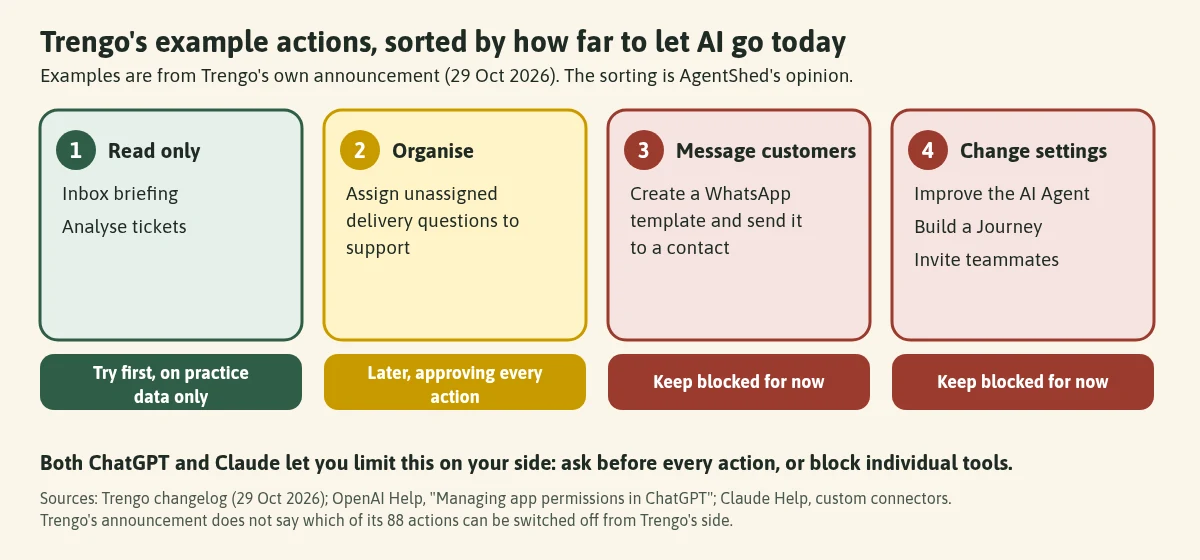
Trengo's own examples of what you could ask for:
| Trengo's example | What kind of action it is |
|---|---|
| An inbox briefing | Reading |
| Analysing tickets | Reading |
| Finding what your AI Agent couldn't answer this week, to improve it | Reading, then changing settings |
| Assigning unassigned delivery questions to support | Changing conversations |
| Creating a WhatsApp template and sending it to a contact | Messaging a customer |
| Building a Journey | Changing settings |
| Inviting teammates | Changing your team |
Trengo also says the connection works alongside other MCP tools. Its example: "Find delivery complaints in Trengo, check the related Shopify orders and draft replies with tracking."
That's a genuinely useful idea. A support inbox is where a lot of small-business time goes, and an assistant that can brief you on it is attractive.
Our take: not on your live inbox, not yet
We think most small businesses should wait. Not forever, and not because Trengo has done anything wrong. We have no evidence of that. The reasons are these.
1. A customer inbox is the riskiest place to connect an AI assistant. Anthropic's help centre explains the problem plainly. When Claude reads content "outside your trust boundary", that content may have been "deliberately crafted by an external attacker to manipulate Claude's behavior". It calls this prompt injection, and gives an email example: you ask Claude to summarise your emails, and one message says to ignore your instructions and transfer money. It adds that for these attacks to work, "two things must be true at the same time: Claude can read information outside your trusted boundary, and can perform actions that could compromise the user."
A customer inbox is made of messages from people outside your business, by design, and Trengo says the connection can take actions. That is the combination Anthropic describes. (Anthropic's page is about Claude Cowork, but it sets out the general rule, and OpenAI gives similar warnings about connecting servers.)
2. Trengo's announcement doesn't say how the connection is limited. It says you approve actions. It doesn't say, on the page we read, which of the 88 actions you can switch off from Trengo's side, which Trengo permissions the connection uses, or what happens to the data your AI tool reads. Trengo's user roles page describes roles such as Administrator, Advanced agent and Basic agent, and says permissions can be configured on Pro accounts. We couldn't find a statement about how those roles apply to the MCP connection, so don't assume they do.
3. Writing actions sit next to reading actions. Sending a WhatsApp template to a contact, inviting teammates and building a Journey aren't the same as asking for a summary. You can't undo a message that has gone to a customer.
4. The AI side has settings too. ChatGPT's help says an enabled app may access relevant context from your conversations, and that if Memory is on, ChatGPT may remember relevant information accessed from the app. It also says: "For ChatGPT Free, Plus, Go, and Pro users: OpenAI may use information accessed from apps to train our models if your 'Improve the model for everyone' setting is on." That's OpenAI's wording. Read the current page before you connect anything that holds customer messages.
5. You're still the one responsible. Anthropic's page says: "You remain responsible for all actions taken by Claude performed on your behalf", including "any content published or messages sent".
None of this says "never". It says: earn the trust in steps.
How to test it safely, in order
If you use Trengo and want to try, here's the order we'd follow. These are our suggestions, built on the controls the AI tools themselves provide.
- Use practice conversations first. Put a handful of made-up conversations in Trengo, for example a pretend customer called "Sam Example" asking about a late parcel. Keep real names, addresses and order details out of your first tests.
- Start read-only. Ask for a briefing or a summary and nothing else. In ChatGPT, the app permissions page lists the options "Always ask", "Allow read actions", "Allow low-risk actions" and "Allow all actions", and says the last "carries elevated risk". Choose "Always ask" or "Allow read actions". In Claude, you can block individual tools you don't need, and Anthropic's connector guidance says to "Limit these scopes when possible".
- Block the actions that change things. Block anything that sends, deletes, creates or invites. OpenAI lists "sending an email, message, comment, or invitation" and "creating, editing, or deleting a file or record" as examples of higher-risk actions.
- Never click "Allow always" on a customer inbox. Anthropic tells users to review tool approval requests carefully. Make approving each action a deliberate act.
- Use only the connection Trengo offers. Both Anthropic and OpenAI warn against connecting servers you don't trust. Add the connection from Trengo's own integration settings, as its post describes, and not from a third-party page.
- Read what each reply says before it goes anywhere. Let the AI draft; you send.
- Only then consider the live inbox, and only for the read-only jobs that proved useful. Revisit sending actions when you know what each one does.
If you only need help writing replies, you don't need any connection. Our customer FAQ replies playbook shows how to draft answers from your own FAQ text in ChatGPT, pasting in made-up examples as you practise. If your main need is a chat widget on your website, our Tidio playbook covers a different kind of tool.
What would change our mind?
We'd be more comfortable recommending Trengo MCP for live use once Trengo publishes, in plain language:
- which actions the connection can be restricted to, from Trengo's side;
- which user role or permissions the connection acts under;
- what it logs, so you can see what an assistant did in your inbox;
- what Trengo, and the AI tool you connect, keep about the conversations they read.
Trengo's security page says "We will never sell your data" and describes its hosting and encryption, but that's general, not specific to this feature. This post will be updated if Trengo publishes more.
Get the next guide by email. One email when we publish a new AI workflow. Join the AgentShed newsletter.
How we made this
AI-assisted, and checked against Trengo's changelog and help pages, the OpenAI and Anthropic help centres, on 31 October 2026. We haven't connected Trengo to Claude or ChatGPT, and we haven't tested its actions. The opinions are ours and the quotes are from the pages linked. We aren't giving legal advice. See how we research a playbook.
FAQ
Is Trengo MCP safe? We can't say, and we haven't tested it. Trengo's announcement says you review and approve proposed actions. It doesn't say how the connection is limited. That's why we suggest read-only tests first.
Does it cost extra? The announcement says it's live "for every customer". It doesn't mention pricing, so check your Trengo plan and Trengo's pricing page.
Can I use it with Claude's free plan? Anthropic's help says custom connectors using remote MCP are available on Free (limited to one), Pro, Max, Ultra, Team and Enterprise. For ChatGPT, OpenAI's help says full custom MCP support is for Business and Enterprise/Edu on the web, and that Pro can connect custom MCP servers with read/fetch permissions only. We haven't checked how Trengo's connection is offered in ChatGPT, so look at your plan on OpenAI's page. Plans change, so check the current pages. On a work plan, an admin may control it.
Can I stop the AI sending messages to customers? Both tools give you controls: ChatGPT's permission levels, and Claude's option to block individual tools. Use them, and keep approving each action yourself. Trengo's post doesn't say whether it can restrict this on its side.
Does this involve customers' personal data? Yes. Customer names, contact details and messages are personal information. The ICO's guidance for small organisations says data protection laws "probably apply" when you hold and use people's personal information as part of your usual business. The ICO says that guidance is under review after the Data (Use and Access) Act, so check its live pages. The same cautions apply to any tool you connect to customer messages, so check what each one can see before you switch it on.
This is general information, not legal advice. If you're unsure what data protection means for your business, check the ICO's pages or ask a qualified adviser.
Your next step
If you use Trengo, don't connect your live inbox this week. Make five pretend conversations, try one read-only briefing, and see what the assistant asks to do before you decide anything else.
Sources (all read 31 October 2026): Trengo changelog, 29 Oct 2026 · Trengo, User roles · Trengo, security · Claude, custom connectors with remote MCP · Claude, Use Claude Cowork safely · OpenAI, Managing app permissions in ChatGPT · OpenAI, Connecting custom MCP servers · OpenAI, Connected apps in ChatGPT · ICO, Data protection: advice on common topics
Sources
- Trengo changelog: Your Trengo expert inside every chat, with Trengo MCP (29 Oct 2026) — accessed 31 October 2026
- Trengo Help Center: User roles — accessed 31 October 2026
- Trengo: Security — accessed 31 October 2026
- Claude Help Center: Get started with custom connectors using remote MCP — accessed 31 October 2026
- Claude Help Center: Use Claude Cowork safely — accessed 31 October 2026
- OpenAI Help Center: Managing app permissions in ChatGPT — accessed 31 October 2026
- OpenAI Help Center: Connecting custom MCP servers in ChatGPT — accessed 31 October 2026
- OpenAI Help Center: Connected apps in ChatGPT — accessed 31 October 2026
- ICO: Data protection, advice on common topics (small organisations) — accessed 31 October 2026
Related playbooks
Related tools
More from the blog
News
AI Use Among UK Businesses Has Doubled: What a New Government Survey Means for Small Firms
A government survey published on 29 October found AI use among UK private-sector businesses with 5+ employees doubled to 32%. What it means for small firms.
31 October 2026
News
Mistral Just Released a Trillion-Parameter Open Model: What Open Weights Mean for Small Businesses
Mistral released the weights of Mistral Large 4. What open weights mean, what the licence says, and why most small firms will only meet it indirectly.
30 October 2026
News
Small AI Models Are Moving Onto Your Own Computer: What It Could Mean for Small Businesses
Liquid AI and Opera both shipped AI that runs on your own device this week. What that could mean for a small business, and what to do now.
29 October 2026