Some links earn us a commission.
Guide
Automate Your Weekly Admin With AI: A 20-Minute Audit for Small Businesses
Desk research by Penelope Voss
29 October 2026

In short: Don't automate everything. Spend 20 minutes listing last week's repeat admin jobs, score each for effort and risk, and pick one low-risk job, such as drafting a reminder. Do it by hand with an AI chat first. Only move it to Make or n8n if the hand version works and keeps saving you effort.
Why start with an audit?
Most small businesses don't have an "automation problem". They have ten small repeat jobs and no idea which one is worth the effort. An audit fixes that in about 20 minutes with a pen and paper, and nothing to sign up for.
The goal is to end with one job, not a list of ten.
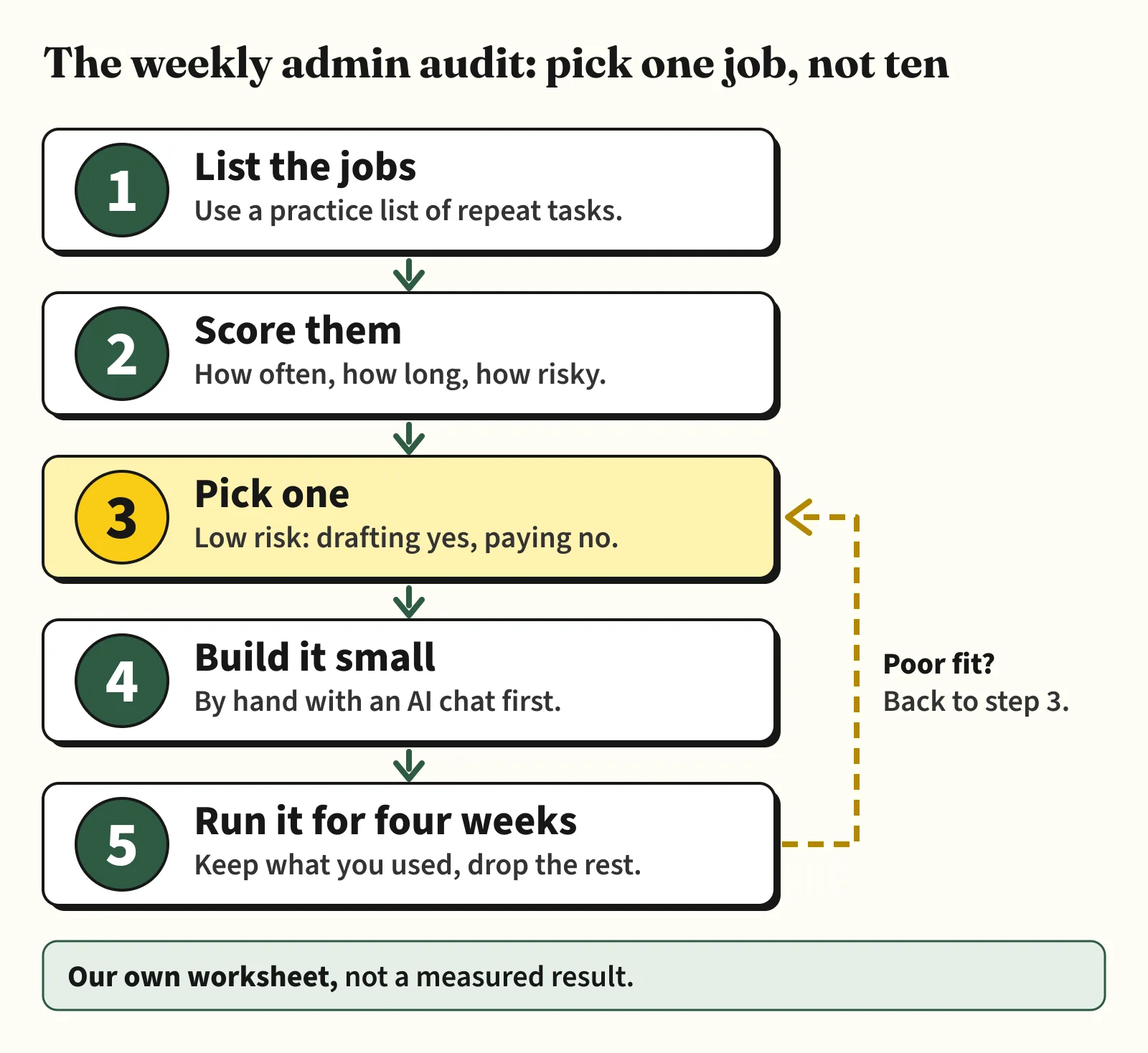
How do you list and score the jobs? (Steps 1 and 2)
Write down every repeat task from last week. Then score each one on three things: how often it happens, how long it takes, and what goes wrong if it's done badly.
Here is a made-up practice week for an imaginary cleaning company. The numbers are invented to show the method, not data from any real business.
| Job | How often | Minutes each time | If it goes wrong | Good first pick? |
|---|---|---|---|---|
| Reminder to chase unpaid invoices | Weekly | 20 | Money and awkward emails | Maybe, as a draft only |
| Answer the same customer questions | Daily | 5 | Wrong answer reaches a customer | Maybe, drafts you check |
| Write Monday's to-do list from emails and calendar | Weekly | 15 | You miss one item | Yes, low risk |
| Post to social media | Three times a week | 10 | An awkward post | Maybe |
| Pay supplier invoices | Weekly | 20 | Wrong payment | No, keep it manual |
The pattern is simple. Jobs that draft, sort or remind are good candidates. Jobs that pay, send or delete are not. A person should always make the final move.
How do you pick one job? (Step 3)
Choose the job that repeats, takes a noticeable chunk of your week, and is low risk if it goes wrong. In the practice table that's the Monday to-do list.
AgentShed has a playbook for several of these jobs. Each tells you what was and wasn't tested:
- Monday admin digest with n8n: partly tested. The schedule, filters and email ran in n8n with sample data. The Gmail, Google Calendar and Google Sheets connections were not tested.
- Invoice-chasing drafts with Make: partly tested. Its chase rules ran in n8n on sample invoices; Make and Gmail were not used.
- Customer FAQ replies with ChatGPT: partly tested. The prompts were tried with a stand-in AI assistant on made-up emails; ChatGPT was not used.
How do you build it small? (Step 4)
Before you connect any software, do the job once with an AI chat such as ChatGPT on a free plan. This shows you whether the AI output is useful, and costs nothing.
Copy-and-paste prompt (use invented text only):
You are my admin helper. Below is a made-up list of last week's emails and this week's calendar for a pretend cleaning company. Write a short Monday to-do list: first anything that needs a reply, then this week's appointments, then any invoice marked overdue. Keep it under 150 words and don't invent anything that isn't in the list.
Paste in practice text. Don't paste real customer names, bank details or private emails while you're testing. If the hand version is useful week after week, you have a case for automating it. If it isn't, you've saved yourself a build.
Get the next guide by email. One email when we publish a new AI workflow. Join the AgentShed newsletter.
When should you move it into a tool? (Step 5)
If you've used the hand version for a few weeks and want it to run on its own, two tools come up often. Read the vendors' own pages for current limits, because they change.
| Option | What it costs to start | How usage is counted | Watch out for |
|---|---|---|---|
| AI chat by hand | Free plan | Plan limits | You press the button each week |
| Make | Free plan, 1,000 credits a month (see pricing) | Credits: most actions cost 1, some AI features more | Scenarios stop when credits run out. Unused credits expire at the end of each monthly term |
| n8n | Community Edition is free to self-host. Cloud has a free trial with no card | Executions: one whole workflow run counts as one | Self-hosting means you run the server, updates and backups yourself. Cloud plans are paid, so we haven't recommended one |
A quick bit of our own arithmetic (not a test): Make says most actions use 1 credit. A weekly workflow with 10 actions would use about 10 credits a run, so around 40 to 50 credits in a month. That is a small part of the 1,000 free credits. Add AI steps and the figure rises, so check Make's page. On n8n, a weekly workflow is about four to five executions a month however many steps it has, and n8n says its free trial includes 1,000 executions.
How do you keep it safe?
- Start with drafts. Let the tool prepare, and keep the sending and paying for yourself.
- Use practice data until you trust a flow, then add real details slowly.
- Check each tool's privacy and data settings before you connect your email, calendar or accounts.
- If a flow touches money or legal matters, have a person check the output.
How we made this
AI-assisted, and checked against Make's and n8n's own pages on 29 October 2026. We haven't built or run the flow described in this guide. The practice week, prompt and arithmetic are our own illustrations, not measured results. The only testing referred to is on the n8n digest playbook, where the page says what ran and what didn't. The Make links are affiliate links; the n8n link is a plain vendor link. See how we research a playbook.
FAQ
Do I need Make or n8n to save effort on admin? No. Many jobs are fine with an AI chat and a free plan. Move to a workflow tool only if you keep doing the same copy-and-paste each week.
Which job should a small business automate first? A low-risk one that drafts, sorts or reminds, such as a Monday to-do list. Keep paying and sending in human hands.
Is it safe to connect my email to an automation tool? That depends on the tool's permissions and your settings, and we haven't tested it. Start with practice data, read the vendor's privacy page and connect as little as you can.
How long should I run a flow before deciding? Our worksheet suggests four weeks, then keep what you used and drop what you ignored. That's a rule of thumb, not a tested figure.
Your next step
Set a 20-minute timer, write your list for last week, and circle one job from the "draft, sort or remind" group. Try it by hand with the practice prompt, and come back to the playbook that matches.
Sources
- Make: Pricing and subscription packages (credits, free plan) (affiliate link) — accessed 29 October 2026
- n8n: Plans and pricing (executions, Community Edition, free trial) — accessed 29 October 2026