Some links earn us a commission.
Guide
Log Every New Enquiry in a Free CRM: What We Tested in Capsule
Desk research by Penelope Voss
20 November 2026

In short: We logged a web enquiry and a phoned enquiry in Capsule's free plan on 10 November 2026. The default web form has no phone field, and after submit it landed on a blank page. The contact still arrived, with the message as a note and an automatic check-lead task. Use the default pipeline stages: adding a custom one failed.
How do I log every new enquiry in a free CRM?
You can log web and phoned enquiries in Capsule's free plan, and we tested that core flow on 10 November 2026. A web form is available on free: you download its HTML and paste it into your site. A phoned enquiry can be typed in by hand, with an opportunity and a follow-up task. Use Capsule's default pipeline stages. We did not get a custom milestone to save.
This was a test on a test account with made-up contacts, for about 14 minutes (10:11:59 to 10:25:51 GMT). Settings showed "Free Plan", plus a banner that read "7 days left to try our premium features for free." For a product summary see our Capsule CRM page. Our Capsule free-plan review and Capsule vs HubSpot Free comparison cover the plan limits and the earlier partial test.
What did we actually test?
We ran the enquiry-logging steps end to end, with one sub-step that failed. Here's what happened.
| What we tried | Result |
|---|---|
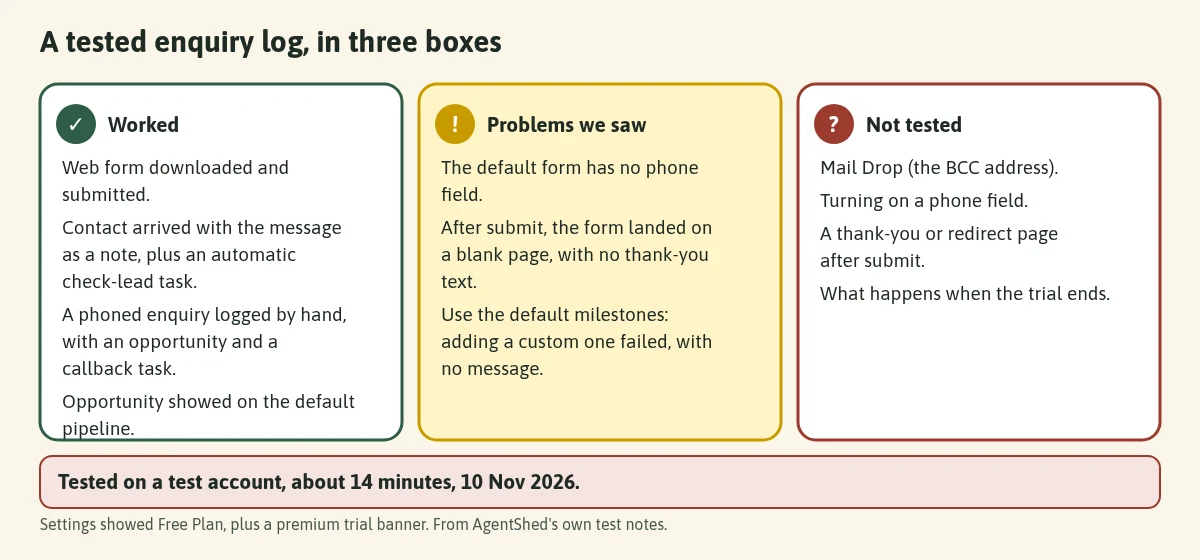
| Sign-in on a new browser | Worked after a 6-digit email security code. The username field wanted a username; the email address was rejected. |
| Plan check in Settings | Showed "Free Plan", plus the trial banner. |
| Capsule's contact form (web-to-lead) | Available on free. We downloaded the HTML and submitted it with made-up details. |
| After submit | The form redirected to a blank page with no thank-you text. The contact appeared 1 minute 27 seconds later, with the message stored as a note, plus an automatic task: "check lead created by the web form". |
| Phoned enquiry, logged by hand | Worked. We added a made-up contact, a note, an opportunity and a callback task. The opportunity showed on the Sales Pipeline board. |
| Adding a custom milestone, "Quote sent" | Did not work. The dialog stayed open with no message, and the milestone was not added. |
| Mail Drop (the BCC address) | Not tested. No email was sent. |
How do I add Capsule's web form to my site?
Download the form HTML from Capsule and paste it into your website. There is no hosted form URL. In our test the builder was at Settings > Contact Form. The default fields were first name (required), last name, organisation, email and message. Phone is not in the default form, and we did not turn it on, so we haven't tested a phone field. "Show Capsule Branding" (turning branding off) was marked as a paid-plan option.
The downloaded form posts to Capsule's new-lead service. You'll need your own form from your own account; don't reuse someone else's HTML.
What happens after someone submits the form?
In our test, the form landed on a blank page, with no thank-you text. The contact still arrived 1 minute 27 seconds later. The enquiry message was stored as a note, and Capsule created a task automatically: "check lead created by the web form".
If the builder lets you set a redirect or thank-you page, set one before you put the form on a live site. We didn't test that setting, so we can't say how it behaves. Don't assume the person who enquired will see a confirmation.
How do I log a phoned enquiry?
Type the person in by hand, add a note, then add an opportunity and a callback task if you need them. We added a made-up contact with a UK drama phone number and a note of the call, created an opportunity on the default pipeline, and set a follow-up task. All of that worked, and the opportunity appeared on the Sales Pipeline board.
Stay on the default milestones (the stages a deal moves through). We tried to add a custom milestone called "Quote sent" and it failed: the dialog stayed open with no error message, and the milestone was not added. That's the same failure we saw in the earlier free-plan test. Don't plan a workflow that depends on custom stages on this plan.
What should I check before I go live?
- The form fields. The default form has no phone field. Add one in the builder if you need a number, and test it yourself — we didn't.
- The page after submit. Expect a blank screen unless you configure a redirect or thank-you page.
- The automatic task. Each web lead created a "check lead" task in our test. Use it as a prompt to reply the same day.
- New-device sign-in. A new browser sent a 6-digit "log in security code" by email. Have access to the account email.
- Pipeline stages. Use the default milestones. Custom ones failed for us on this account.
- Your own account. We used made-up contacts on a test account. Try the form with your own test details before you publish it.
If you want to look at Capsule's plans, Capsule's site lists them. That is an affiliate link: Capsule is an AgentShed affiliate, so we may earn a commission if you sign up through it, and it doesn't change what we say. Getting the form onto a page is only half the job: our lead capture guide covers what to ask for, and our Zapier lead-capture playbook is another way to land enquiries in a sheet.
Get the next guide by email. One email when we publish a new AI workflow. Join the AgentShed newsletter.
How we made this
AI-assisted. We tested this enquiry-logging flow in Capsule on 10 November 2026, on a test account with made-up contacts, and wrote down what happened. Mail Drop, a phone field and a thank-you page were not tested. Capsule is an AgentShed affiliate. Prices and plan limits are covered in the Capsule review, from pages read earlier; they change, so check the live page. See how we research a playbook.
FAQ
Can I log web enquiries in Capsule's free plan? Yes, in our test. The contact form was available on free. We downloaded the HTML, submitted it, and the contact arrived with a note and an automatic check-lead task.
Does the default Capsule web form include a phone field? No. The default fields were first name, last name, organisation, email and message. Phone is in the builder but was off, and we didn't turn it on.
What do people see after they submit the form? In our test, a blank page with no thank-you text. The contact still arrived. Set a redirect if the builder allows it, and test it yourself.
Can I add my own pipeline stages on the free plan? We couldn't. Adding a custom milestone failed, with no message on screen. Use the default milestones.
Did you test Capsule's Mail Drop? No. A drop-box address exists in settings, but we didn't send email to it.
Have you fully tested Capsule? We've tested this enquiry-logging flow, and earlier we partly tested the free plan (sign-up, a CSV import, an opportunity and tasks). We haven't tested Mail Drop, email or calendar connection, or what happens when the trial ends.
Your next step
Create the contact form in your own Capsule account, download the HTML, and submit one made-up enquiry. Check that the contact, the note and the check-lead task arrive, and decide what people should see instead of a blank page before you put the form on your site.
Sources: Capsule test results come from AgentShed's own test notes, 10 November 2026. Plan context: Capsule CRM pricing, read 3 November 2026.
Sources
- Capsule CRM pricing (UK, GBP) — accessed 3 November 2026
- Capsule CRM — accessed 10 November 2026
Related playbooks
Related tools
More from the blog
Tools
Capsule CRM Review for UK Small Businesses: What We Found on the Free Plan
We tried part of Capsule CRM's free plan: sign-up, a CSV import, a pipeline and tasks. UK prices, the limits, and how it compares with HubSpot Free. A partial test.
19 November 2026
Tools
Capsule CRM vs HubSpot Free CRM for UK Small Businesses: Which Free Plan Fits?
Capsule Free beside HubSpot Free: users, contacts, pipelines and first paid step, from Capsule's partial test and both pricing pages. We haven't tested HubSpot.
18 November 2026
Guide
AI Agent vs Chatbot vs Automation: What's the Difference for a Small Business?
A plain-English guide to AI agents, chatbots and automation: who picks the next step, which job suits which, and what to keep in human hands.
11 November 2026