Some links earn us a commission.
Guide
What Customer Data Are You Giving AI When You Connect Your Inbox, CRM or Shop? Six Rules to Set First
Desk research by Penelope Voss
3 November 2026

In short: When you connect your inbox, CRM or shop to an AI tool, it can usually reach whatever your login can reach: customer names, contact details, messages and orders. Set six rules first: least access, review before anything is sent, made-up data for testing, check the settings, write it down, and disconnect what you don't use.
The short version
Don't connect first and think later. Connecting an AI assistant to your inbox, customer list or online shop feels like installing an app. It's closer to handing a stranger a key to the stockroom and asking them to be helpful. They might be excellent. You still decide which rooms the key opens.
This guide covers what you're really sharing, what the UK's data protection regulator says, and six rules we think every small business should set before it connects anything. This is general information, not legal advice, and we're not lawyers. Where the rules matter, we quote the Information Commissioner's Office (ICO) and link to it. For your own situation, check the ICO's live pages or ask a qualified adviser.
What you're actually handing over
Three things change when you connect rather than paste.
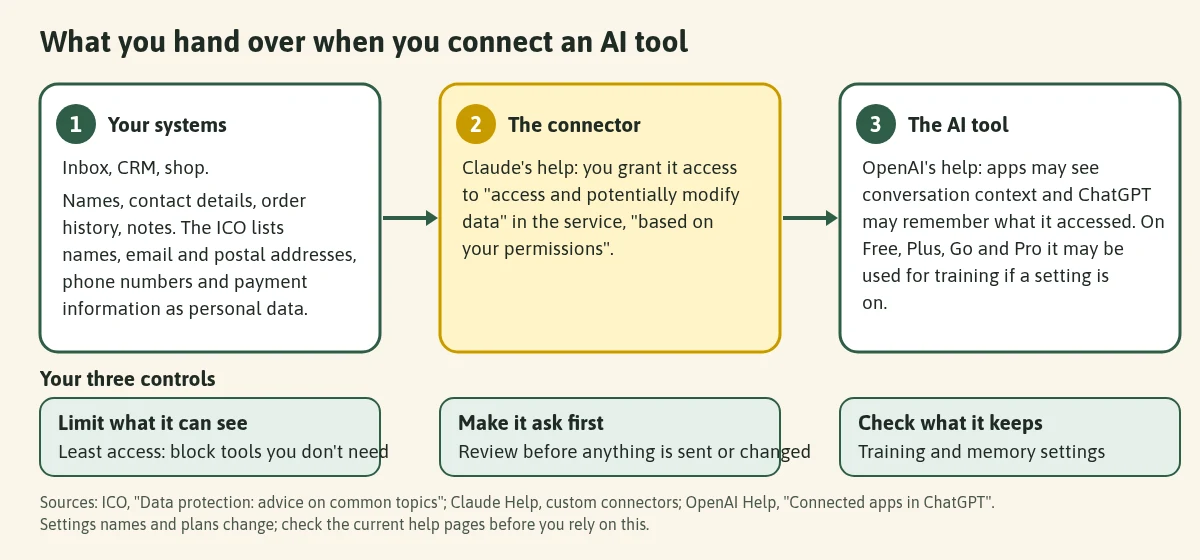
1. What it can see. Anthropic's help centre puts it plainly: "When you connect Claude to external services, you're granting it the ability to access and potentially modify data within those services based on your permissions." In practice that usually means everything your login can see, not only the one customer you're asking about. Where a connector uses an API key or other fixed credential, Anthropic says that on Team and Enterprise plans everyone who uses it reaches the service with that same credential, so it recommends using one limited to what members should access.
2. What it can do. Reading is one thing. Writing is another. Anthropic splits tools into read tools, which let Claude "access and read content", and write tools, which "let Claude perform actions in your environment", and says write tools "inherently carry more risk". OpenAI lists "sending an email, message, comment, or invitation" and "creating, editing, or deleting a file or record" as examples of higher-risk actions.
3. What the AI tool keeps. OpenAI's help says an enabled app may access relevant context from your conversations, and that if Memory is on, ChatGPT may remember relevant information accessed from the app. It also says: "For ChatGPT Free, Plus, Go, and Pro users: OpenAI may use information accessed from apps to train our models if your 'Improve the model for everyone' setting is on." For Business, Enterprise and Edu plans, it says that isn't the default. Anthropic's privacy page, which covers its consumer plans (Free, Pro and Max), says that the chat data it may use for improving its models "does not include raw content from connectors (e.g. Google Drive), including remote and local MCP servers, though data may be included if it's directly copied into your conversation." Settings and plans change, so read both current pages.
What counts as customer data?
More than you'd guess. The ICO's guide for small organisations says personal data includes names and contact details such as email or postal addresses, phone numbers and payment information. It says customer contact details "will tell you who someone is" and, along with similar records, "reveal the identity of a person".
| Where it sits | Typical customer data (check your own set-up) |
|---|---|
| Inbox | Names, email addresses, and everything customers choose to write |
| CRM or customer list | Names, phone numbers, notes, history |
| Online shop | Names, postal addresses, order history |
| Anything connected to payments | Payment information, which the ICO lists as personal data |
What the ICO says
We're quoting, not advising. The ICO pages below were current when we read them on 31 October 2026. Four of the five ICO pages we used carry a notice that they're under review following the Data (Use and Access) Act, so check the live page.
- It probably applies to you. "Data protection laws probably apply, because it's likely you're holding and using people's personal information as part of your usual course of business." (ICO, small organisations)
- There's no AI exception. "There is no 'AI exemption' to data protection law." (ICO, tackling misconceptions)
- Common practice isn't the test. "Common practice does not equate to meeting people's reasonable expectations." The ICO says organisations shouldn't assume a way of processing is within people's reasonable expectations just because it's seen as common practice. (same page)
- Take only what you need. On data minimisation, the ICO's AI guidance says to "identify the minimum amount of personal data you need to fulfil your purpose, and to only process that information, and no more." (ICO, security and data minimisation in AI)
- Security matters more with AI. "Using AI to process any personal data has important implications for your security risk profile, and you need to assess and manage these carefully." (same page)
- Buying in AI is a procurement decision. The same guidance says that if you buy in AI systems or use ones run by third parties, those considerations "should form part of the procurement process due diligence."
- Suppliers need a written contract. "Whenever a controller uses a processor, there must be a written contract (or other legal act) in place." (ICO, contracts) Whether an AI provider counts as a "processor" in your situation is a legal question. The ICO explains the terms on its controllers and processors page; check the provider's terms and take advice if you're unsure.
- The ICO can't check every tool for you. "We can't tell you if a particular platform or programme is compliant because we can't check every IT product and service that enters the market. You have to assess and respond to the risks as you see them and decide for yourself whether a product or service is appropriate for how you plan to use it."
- Higher-risk data needs more care. The ICO says to carry out a data protection impact assessment if what you're planning "is likely to result in a high risk to people", for example "sensitive data such as medical data or information about children or vulnerable adults". Our view: if that's you, don't connect AI to those records without proper advice.
The ICO's list of common complaints from customers includes "you haven't kept their personal data secure", "you've given their personal information to someone else" and "you're using their personal information for something other than what you said you would." Each of those is easier to avoid if you control what the AI can reach.
Six rules we'd set before connecting anything
These rules are our recommendations. The sources show where each comes from.
1. Least access: connect the smallest thing that does the job
Connect one system, not all three. Give the connection the narrowest login you can. Anthropic's connector guidance tells users to review the permissions a connector asks for and to "Limit these scopes when possible", and to disable tools they don't need; its connector settings let you block individual tools. This is the practical form of the ICO's data minimisation point.
Our view: if the job is "draft replies to delivery questions", it doesn't need your whole customer list.
2. Review before send, every time
Don't let an AI send, delete, create or invite on its own. In ChatGPT, the permission levels run from "Always ask" to "Allow all actions", and OpenAI says the last "carries elevated risk". Anthropic's guidance warns about clicking "Allow always" without thought. Choose the setting where a person approves each action.
Our view: the AI drafts; you press send. Anthropic's page says "You remain responsible for all actions taken by Claude performed on your behalf", including messages sent. Assume the same of any tool.
3. Test with made-up practice data
Before real customers go anywhere near a new connection, create pretend ones: "Sam Example, 1 Test Street, order 0001, asking where the parcel is." Run your whole routine on those. You'll learn what the tool reads, what it offers to do, and how it phrases replies, with nothing at stake.
Our view: if you can't test it without real customer data, you aren't ready to use it with real customer data.
4. Check the AI tool's settings and terms yourself
Look at what the tool does with what it reads: training settings, memory, and what changes on a business plan. Then read the provider's terms. We won't interpret them for you, and you shouldn't take anyone's summary, including ours, as the last word. If a contract or data agreement is needed, the ICO's contracts guide lists what it should cover: for example acting only on documented instructions, security, sub-processors, and deleting or returning data at the end.
5. Write it down
Keep a one-page note: what's connected, to which AI tool, who set it up, what it can read and do, which settings you chose, and the date you last reviewed it. It takes minutes to write and answers the question "what can this thing see?" when a customer, supplier or colleague asks. If an AI tool ever does something odd, you'll know where to look.
6. Disconnect what you don't use
Switch off connections and scheduled or triggered tasks you've stopped needing. OpenAI notes that ChatGPT supports event-triggered tasks, such as on new Gmail messages, and Anthropic advises against scheduled tasks that access sensitive files or send messages on your behalf, because you can't watch them in real time. Review the list each month and remove anything idle.
Which way of using AI shares the least?
| How you use it | What the AI sees | Our view |
|---|---|---|
| Pasting in made-up or tidied text | Only what you paste | The best place to start |
| A connector, read-only, one system, approvals on | What your login can read, in that system | Fine once rules 1 to 5 are done |
| A connector that can write or send | The above, plus it can change things | Only with approval on each action, after testing |
| Automatic, scheduled or triggered runs | Whatever the trigger touches, unwatched | Hold off for anything involving customer messages |
If you want help with replies but aren't ready to connect anything, start with pasting. Our customer FAQ replies playbook uses your own FAQ text in ChatGPT, and the Gmail triage playbook and Outlook triage playbook show the same idea for email, starting from made-up examples. Both ChatGPT and Claude have tool pages covering plans and what they do.
Automation platforms move customer data too. If you use one such as Make (our Make page explains its free plan), ask the same three questions: what does it read, where does it send it, and can it send without you?
Want a real example? In our news piece on Trengo's new connection for Claude and ChatGPT, we apply this approach to a customer inbox.
Get the next guide by email. One email when we publish a new AI workflow. Join the AgentShed newsletter.
How we made this
AI-assisted, and checked against the ICO pages, the OpenAI and Anthropic help and privacy pages linked here, on 31 October 2026. The quotes are from those pages. We haven't tested any connector for this guide, and we aren't giving legal advice. The six rules are our suggestions, not requirements from the ICO or the AI providers. See how we research a playbook.
FAQ
Does data protection law apply to my small business? The ICO says it "probably" does if you hold and use people's personal information as part of your usual business. Read its small organisation guidance and take advice on your own situation.
Is it OK to paste a customer email into ChatGPT? We can't say what's lawful for you. Our rule is simpler: practise with made-up text, and read the tool's data settings and terms before you use real customer details. The ICO says you need to decide for yourself whether a product is appropriate for how you plan to use it.
Will the AI company train on my customers' messages? It depends on the tool, the plan and your settings. OpenAI's help says information accessed from apps may be used for training on some plans if a setting is on. Anthropic's privacy page says the consumer chat data it may use for improving models doesn't include raw content from connectors, unless the data is copied into the conversation. Check the current pages for your plan and settings.
Do I need a data protection impact assessment? The ICO says you need one if your plans are likely to result in a high risk to people, for example when handling sensitive data such as medical data or information about children. If you aren't sure, ask for advice.
What's the one thing to do first? Make five pretend customers and run your routine on them.
Your next step
Write down which of your systems an AI tool could reach today, who set each connection up, and whether it can send or change anything. Then apply rules 1 to 3 to the one connection that matters most.
Sources (all read 31 October 2026): ICO, small organisations · ICO, security and data minimisation in AI · ICO, tackling misconceptions · ICO, contracts · ICO, controllers and processors · OpenAI, Connected apps in ChatGPT · OpenAI, Managing app permissions · Claude, custom connectors · Claude, Use Claude Cowork safely · Claude, model training and data
Sources
- ICO: Data protection, advice on common topics (small organisations) — accessed 31 October 2026
- ICO: How should we assess security and data minimisation in AI? — accessed 31 October 2026
- ICO: Tackling misconceptions about generative AI — accessed 31 October 2026
- ICO: Contracts (guide to accountability and governance) — accessed 31 October 2026
- ICO: What are controllers and processors? — accessed 31 October 2026
- OpenAI Help Center: Connected apps in ChatGPT — accessed 31 October 2026
- OpenAI Help Center: Managing app permissions in ChatGPT — accessed 31 October 2026
- Claude Help Center: Get started with custom connectors using remote MCP — accessed 31 October 2026
- Claude Docs: Add an unlisted custom connector (blocking individual tools) — accessed 31 October 2026
- Claude Help Center: Use Claude Cowork safely — accessed 31 October 2026
- Claude Privacy Center: Is my data used for model training? — accessed 31 October 2026
Related playbooks
Related tools
More from the blog
Guide
Write Email Replies Faster With AI: A Simple Reply Kit for Small Businesses
Build a reply kit once: a facts sheet, two sample replies and three rules, so a free AI chat drafts emails in your voice. Practice data only, you send.
30 October 2026
News
Trengo Now Lets Claude and ChatGPT Act Inside Your Customer Inbox. Don't Switch It On Yet
Trengo says its MCP connection is live for every customer, with 88 actions for Claude and ChatGPT. Why small businesses should wait, and how to test it safely.
1 November 2026
Tools
Lusha Review UK for Small Business: Free Credits, Pro in Pounds and Who It Isn't For
What Lusha's 40 free credits get you, what Pro costs in pounds (billed in US dollars, rate dated 2 Nov 2026) and who it isn't for. Not hands-on tested.
2 November 2026