Some links earn us a commission.
News
Google Is Testing a Free AI Agent That Texts Your Customers. Here's What to Check Before You Switch It On
Desk research by Penelope Voss
6 November 2026

In short: Google is inviting some businesses to a free pilot in which an AI agent answers routine customer questions by text from Search and Maps, then hands over what it can't answer. Reports say it works only on RCS-capable phones, and Google hasn't published which countries are included. Fix your profile first, then decide who takes over.
The short version
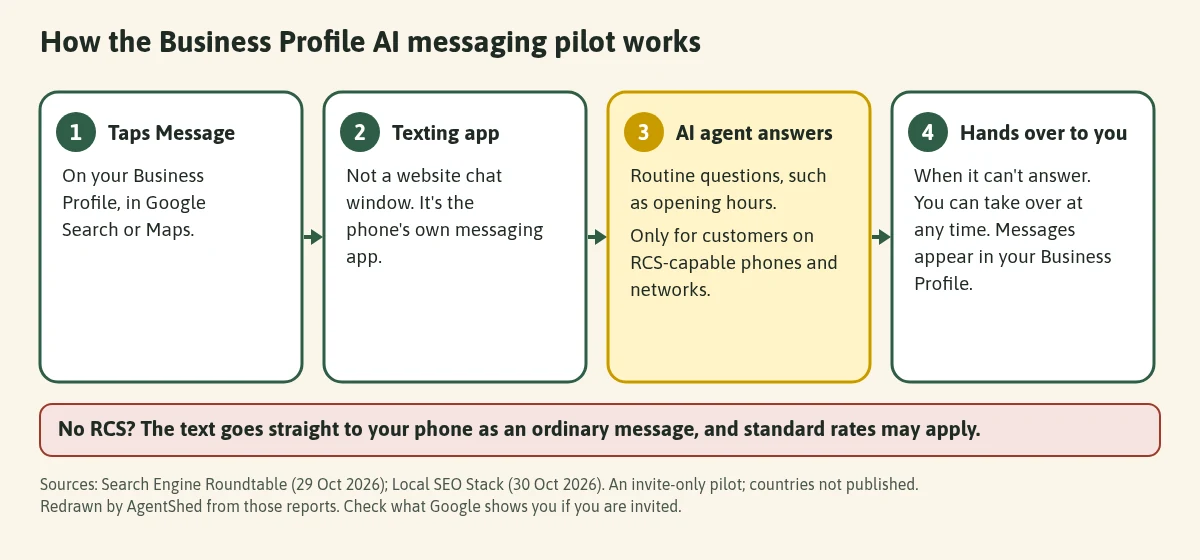
Google has started inviting more businesses to try an AI agent that answers customer messages on their behalf. A customer taps Message on your Business Profile in Search or Maps. The agent replies to the routine stuff. You pick up the rest.
It's a pilot, not a launch, and as far as the reports show it's invite-only. Here's our view: if the invite lands, don't switch it on the same day. The agent can only be as good as your profile, and most profiles are less accurate than their owners think. Spend half an hour on the profile first. If you haven't been invited, do that half hour anyway, because wrong opening hours already cost you customers.
What Google is testing
Search Engine Roundtable reported on 29 October 2026 that Google "seems to be rolling out access" to Business Profile AI-powered messaging to more businesses. It quotes Google's own set-up text:
- The feature lets you "connect with customers from Search and Maps and let them message your business on their phone's native messaging app."
- Its AI agent "will answer routine questions from customers, instantly and at no cost."
- If the agent can't answer, it hands the question over, and you can take over any conversation at any time.
- All the messages are available in the Business Profile.
The same report quotes an invitation email that Mike Blumenthal shared on X: "get early access to the AI-powered messaging pilot on your Business Profile on Search and Maps at no cost… Your agent will redirect complex questions to you." Local SEO Stack notes that email was written for restaurants and mentions help with reservations. Both reports say this isn't entirely new: the feature surfaced earlier this year, and Local SEO Stack says a version of the messages screen appeared for a few hours in June 2026 and then disappeared.
The fine print
Both reports flag the same catch. In Local SEO Stack's words, the agent "only works when the customer's phone and network support RCS", the newer texting standard that replaces plain SMS. Search Engine Roundtable says everyone else's texts "go straight to your phone, and standard text rates may apply". So someone on your side still needs to answer those messages.
Local SEO Stack also says the agent "answers from what Google knows about the business", and quotes Claudia Tomina, who spotted the rollout: "The agent can only answer as well as your profile does."
What we don't know
Be wary of confident summaries of this one. As of the sources we read on 1 November 2026:
| Question | What the reports say |
|---|---|
| Is it available in the UK? | Not stated. Local SEO Stack says Google "hasn't published which countries or business types are in the pilot". |
| Is it only for restaurants? | Not stated. Local SEO Stack says the early reports and the invite email "lean toward restaurants". |
| Can you control what it will and won't answer? | Neither report describes any such controls. |
| Will it stay free? | Google's set-up text says "at no cost". Neither report says what happens after the pilot. |
| Does it work for you? | Search Engine Roundtable's author wrote that he didn't see it on his own profile yet. Tomina says to look for a red dot on Messages in your profile. |
We couldn't find a Google help page for this pilot, so everything above comes from trade press quoting Google's set-up screen and an invitation email. If you're invited, read what Google shows you, not our summary.
Five checks before you say yes
These are our recommendations, not Google's.
1. Audit the profile as if it were a script. Opening hours, holiday hours, services, prices, menu, booking details. Whatever is there is what a customer may hear repeated back, in a text, under your business name. Fix anything out of date first.
2. Name the person who takes over. The handover only works if somebody is reading. Decide who watches the messages, how quickly they reply, and what happens on Sundays. Decide, too, whose phone receives the non-RCS texts.
3. Send it five awkward questions. From a friend's phone, ask the things customers really ask: "Are you open on the bank holiday?", "How much for X?", "Can I change my booking?", "Is this suitable for someone with a nut allergy?", and one that has no answer in your profile. Read every reply. You're checking that it hands over when it should rather than guessing. (The reports don't say whether Google offers a preview, so this is a real message to your business.)
4. Decide what a person always answers. Allergies, medical or safety questions, quotes that depend on the job, refunds, complaints. Our view: none of those should be left to an AI agent, and a free one isn't a reason to relax. The reports don't describe controls for this, so until Google shows you one, treat your profile as the control: put in only what you're happy to see repeated.
5. Read the first weeks of conversations. Local SEO Stack gives the same advice: read what the agent says for the first few weeks and catch wrong answers early. Put a weekly reminder in your calendar and turn it off if the answers aren't good enough.
It isn't the same as Google's "Business Agent"
Don't confuse this with another Google feature. Google's help page describes Business Agent as "a conversational experience on Google Search that allows shoppers to chat with your brand". It says the product "begins its rollout in the US" and lists these criteria to customise it, including "Have a US-based e-commerce store" and "Have a verified Google Merchant Center account". That is a shopper chat on Search for product questions. The Business Profile pilot is about texts from customers who find you on Search and Maps.
Do you still need a paid chat tool?
It depends where your enquiries come from. Local SEO Stack argues that for a business that "only wanted 'someone answers basic questions from Maps'", the free pilot is "a real reason to ask why they're paying for a separate tool", while paid tools still own follow-ups, CRM and review requests. We'd add a limit: the pilot only covers people who message you from Search and Maps. Your website visitors, email and phone calls are untouched.
If your website is where questions arrive, a chat widget such as Tidio is one option. We haven't hands-on tested Tidio, but our website support chat playbook shows the sensible order of work: write the answers first, then switch the bot on. The same applies here. If you'd rather not add any new tool, our customer FAQ replies playbook shows how to turn one written FAQ page into drafted replies in ChatGPT, with you pressing send.
Get the next guide by email. One email when we publish a new AI workflow. Join the AgentShed newsletter.
How we made this
AI-assisted, and checked against the sources linked below on 1 November 2026. The quotes are from those pages. We haven't had access to the pilot and haven't tested it. Two of our sources are industry news sites reporting what Google's screens and emails say, so we've attributed each claim to them. This is general information, not legal or data protection advice. Whether and how you tell customers that an AI is replying in your business's name is for you to check against the rules that apply to you. See how we research a playbook.
FAQ
Can I turn on Google's AI messaging for my business? Only if you've been invited. Reports describe an early-access pilot. Look for a red dot on Messages in your Business Profile, and watch your inbox for an invitation. Neither report says it's open to everyone.
Is it available in the UK? We can't confirm it, so treat UK availability as unconfirmed. Local SEO Stack says Google hasn't published which countries or business types are in the pilot.
What happens if the customer's phone doesn't support RCS? The reports say the agent doesn't answer. The text goes to your phone, and standard text rates may apply.
Can the AI agent take bookings? The reports describe it helping with reservations in a restaurant example, such as offering open times. Neither says how that works for other kinds of business, so check what Google shows you.
Is it free? Google's set-up text says the agent answers "at no cost". That describes the pilot. Check Google's terms and any later announcements.
Your next step
Open your Business Profile and check four things today: opening hours, holiday hours, services and the booking link. Then write the name of the person who'd read the messages.
Sources (all read 1 November 2026): Search Engine Roundtable, 29 Oct 2026 · Local SEO Stack, 30 Oct 2026 · Google Brand Profile Help, Business Agent
Sources
- Search Engine Roundtable: Google Business Profiles AI-Powered Messaging Expands (29 Oct 2026) — accessed 1 November 2026
- Local SEO Stack: Google is inviting more businesses to a free AI agent that texts customers from Search and Maps (30 Oct 2026) — accessed 1 November 2026
- Google Brand Profile Help: Get started with Business Agent — accessed 1 November 2026
Related playbooks
Related tools
More from the blog
News
Trengo Now Lets Claude and ChatGPT Act Inside Your Customer Inbox. Don't Switch It On Yet
Trengo says its MCP connection is live for every customer, with 88 actions for Claude and ChatGPT. Why small businesses should wait, and how to test it safely.
1 November 2026
Tools
Best AI Tools for Customer Enquiries: Reply Assistant, Chat Widget or AI Receptionist?
Six ways to use AI on customer enquiries, from a free reply assistant to an AI receptionist: cost to try, human oversight and who each suits.
9 November 2026
News
AI Editing Is Moving Inside the Chat and the Design Tool: What Gemini and Canva Brush Mean for Small Businesses
Gemini now edits documents and PDFs in the chat, and Canva's Brush model edits designs for Pro users. What to try, what to skip, and the habit to build.
5 November 2026