Some links earn us a commission.
Tools
Best AI Tools for Customer Enquiries: Reply Assistant, Chat Widget or AI Receptionist?
Desk research by Penelope Voss
9 November 2026

In short: Match the tool to where your enquiries arrive. For email and messages, start with a free reply assistant like ChatGPT or Claude and press send yourself. For website visitors, try a chat widget. For missed calls, an AI receptionist. Whatever you pick, a person should handle money, safety and complaints.
The short version
"Best AI chatbot for my business" is the wrong question, because customers don't all contact you the same way. Some email. Some use your website. Some ring while your hands are full. The best tool is the one that sits where your enquiries already arrive, and that keeps a person in charge of the answers that matter.
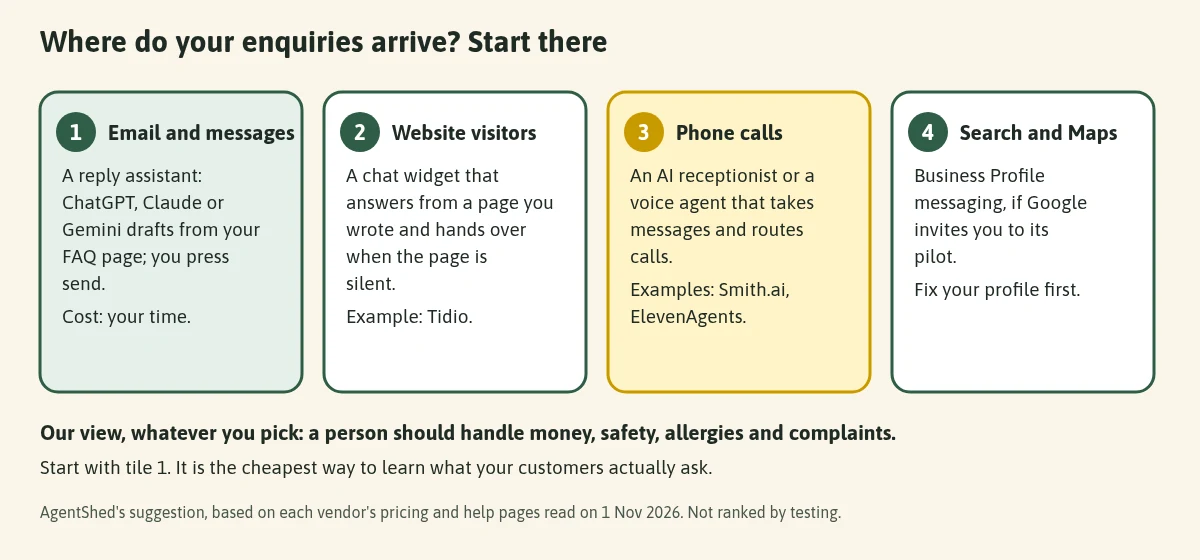
Our view: start with the dullest option, a reply assistant that drafts while you press send. It's free to try, it can't say anything you haven't read, and within a fortnight it shows you what customers really ask. Move to a chat widget or an AI receptionist only when you've found a specific gap, such as missed calls or after-hours messages.
This isn't a ranking, and we haven't hands-on tested these tools. We read each vendor's own pricing or help page on 1 November 2026 and report what it says. Where a vendor makes a claim, we've said so.
The six options at a glance
| Option | Where it helps | Free to try? (per the vendor's page, 1 Nov 2026) | Who answers the customer? |
|---|---|---|---|
| Reply assistant (ChatGPT, Claude) | Email and messages | Free plans listed, with usage limits | You do. The AI drafts. |
| Chat widget (Tidio) | Website visitors | 50 Lyro AI conversations as a starting allowance, plus a 7-day trial | The bot, then a handover to you |
| AI receptionist (Smith.ai) | Phone calls | Free plan: 25 calls a month, then $3 a call | The AI, with a transfer to a live receptionist |
| Voice and chat agent platform (ElevenAgents) | Phone, web, WhatsApp, SMS, email | "15 minutes included for free" | The agent you design |
| Assistant with approvals (Lindy) | Inbox, meetings, routines | $50 in free credits that last 7 days | You approve outgoing actions |
| Google Business Profile messaging | Messages from Search and Maps | Free pilot, by invitation | An AI agent, with a handover to you |
1. A reply assistant: ChatGPT or Claude
How it works: you paste a customer's question and your written FAQ. It drafts a reply. You edit and send.
What the vendors list: ChatGPT's free plan lists "Unlimited text chats with GPT-6", with limited uploads, image creation, voice and deep research, and OpenAI says usage must be reasonable. Claude's free plan lists "Limited usage every 5 hours and every week", and Anthropic's page says how much you can do depends on "the length and complexity of your conversations, the model you choose, and the features you use".
Our view: this is the right first step for nearly everyone. It won't catch enquiries at 2am, but it will make your 9am inbox faster, and it teaches you which questions repeat. Our customer FAQ replies playbook shows the set-up: one page of real prices and rules, replies drafted only from that page, and "I'll check and come back to you" when the page is silent. See also our ChatGPT and Claude pages.
2. A chat widget: Tidio and its Lyro AI agent
How it works: a chat bubble on your website. Its AI agent answers from content you give it and hands over to a person when it can't.
What Tidio's page says: "Every Tidio account starts with 50 Lyro conversations, but you need to upgrade to the Lyro AI Agent plan to refresh it monthly." It lists a 7-day free trial of all features with no card needed, and lists the Lyro AI Agent as a stand-alone product that "Starts at" $32.50 a month, "From 50 Lyro AI conversations" (we haven't checked the billing terms behind that figure). Tidio says its customers "average a 75% resolution rate with Lyro". That is Tidio's claim, and we haven't verified it.
Our view: a chat widget is only as good as the page behind it. If your answers aren't written down yet, it will either say nothing useful or guess. Do option 1 first. When your FAQ page has settled, Tidio is one way to put it on your website, and our website support chat playbook shows the order of work. We haven't hands-on tested Tidio. And one limit to plan for: 50 free AI conversations won't last a busy shop long, so decide before you launch what happens when they're gone.
3. An AI receptionist: Smith.ai
How it works: it answers your phone, takes a message, qualifies the caller and can transfer to a person.
What Smith.ai's page says: the Free plan lists "25 calls/mo ($3.00/call after that)", with 24/7 AI call answering, recording, transcription and summaries. Pro is listed at "$150/mo", with 75 calls a month at $2.00 a call. The page describes a transfer to "a live North America-based receptionist" when something complex comes up, and says the service is month-to-month with 30 days' notice to cancel.
Our view: the closest fit if the real problem is calls you miss while you're on a job. Three checks before you divert your business line. First, UK availability is unconfirmed: the page doesn't say whether callers can reach it on a normal UK number, so ask. Second, ask what a transfer to the live receptionist costs. Third, the page lists call recording and transcription, so work out what you'll tell callers. Recording calls and having an AI answer in your business's name can raise consent and data protection questions, and the rules depend on your country and situation. This is general information, not legal advice. Our Smith.ai receptionist playbook uses a script that takes a name, number and job and never quotes a price. Our Smith.ai page has the detail, and we haven't hands-on tested it.
4. A voice and chat agent platform: ElevenAgents
How it works: you configure an agent's voice, knowledge and workflows, then deploy it to phone, web, WhatsApp, SMS or email. This is a build-it-yourself option.
What ElevenLabs' page says: its sign-up section lists "15 minutes included for free", "Calls and text messages" and "Commercial License included". It says you can "Define guardrails, run simulations, and validate agent behavior with automated tests - before anything reaches a customer."
Our view: the testing tools are the best idea on the page, and every option in this article should have an equivalent: ask your bot awkward questions before customers do. But this is more setup than most small businesses need. Our reading is that the page is aimed at support teams at larger companies, and it doesn't say which phone numbers you'd get, so UK availability is unconfirmed. Ask before you build anything. ElevenLabs is one place to try it if you already know what you want it to say, and for a small business with a plain missed-call problem, option 3 is likely less work. For the voice side, see our guide to AI voices for small businesses.
5. An assistant with approvals: Lindy
How it works: Lindy lists inbox management, meeting scheduling and follow-up, and "Drafts replies in your voice" among what's included.
What Lindy's page says: "Start with $50 in free credits. No credit card required." The FAQ says "The free credits last 7 days. After that, paid usage starts at $29.99 per user per month." It also says "Anything with outside impact waits for approval such as sending an email". One caution on that price: Lindy's pricing page has loaded in two versions for us, one showing $29.99 per user for 3,000 credits and one showing $49.99 for 5,000, so check the live page.
Our view: the approval step is the reason to consider it. An assistant that drafts and then waits is much safer than one that sends. But the free credits last a week, and the paid price is per user. Lindy's page doesn't say whether you can get a UK number, so treat that as unconfirmed. Our Lindy page and our missed-call playbook both stress confirming a UK-dialable number before you build a receptionist on it. Neither has been hands-on tested.
6. Google's own messaging pilot (if you're invited)
If customers find you through Google Search and Maps, Google is inviting some businesses to a free pilot in which an AI agent answers routine texts. Search Engine Roundtable reports Google's set-up text says the agent "will answer routine questions from customers, instantly and at no cost." It's invite-only, and the reports don't say whether it's available in the UK. We cover what to check first in our news piece on the pilot.
Which one for which business?
These are our suggestions, not tested results.
- A trades business that misses calls on the job: an answering option (3 or 5), after you've confirmed a UK number. In our view, missed calls are the obvious place for a trade to start.
- A shop with a busy website and a repeat FAQ: option 1 first, then option 2 once the FAQ page is stable. If order questions (where is it, how do I return it) are most of your inbox, a shop helpdesk such as Gorgias (affiliate link) shows each message next to the order. It charges per ticket, plus a fee for each AI answer, so price both. We haven't tested it; see our Gorgias notes.
- A restaurant or café found on Google Maps: check your Business Profile for an invitation (option 6) and fix your opening hours and menu first.
- A consultancy with mostly email: option 1 and nothing else.
Five rules whatever you choose
- Write the answers first. Every option here works from what you give it. If the source is thin, the bot guesses.
- Our view: a person should handle money, safety, allergies and complaints. We wouldn't let a bot quote a price, promise a refund, or answer an allergy, health or safety question, and if it can't hand over, we wouldn't switch it on. That's our opinion, not a rule or medical advice.
- Test with made-up awkward questions. Ask it ten things, including three your page can't answer. It should hand over, not improvise.
- Know what happens at the limit. Free allowances run out. Decide in advance what a customer sees when they do.
- Tell customers they're talking to an AI. We think it's courteous, and rules about this may apply to your business. If the AI replies in your business's name or calls are recorded, you may have duties to tell people. This is general information, not legal advice, so check what applies to you.
Get the next guide by email. One email when we publish a new AI workflow. Join the AgentShed newsletter.
How we made this
AI-assisted, and checked against each vendor's own pricing or help page, linked below, on 1 November 2026. The quotes come from those pages, and vendor claims are attributed to the vendor. We haven't hands-on tested the tools here, so this isn't a ranking by testing, and prices change: check the live page. The suggestions are our own, and privacy and recording points are general information, not legal advice. See how we research a playbook.
FAQ
What's the best AI chatbot for a small business? It depends where your customers contact you. For email, a free reply assistant. For a website, a chat widget such as Tidio. For calls, an AI receptionist. We haven't ranked them by testing.
Can I use AI to answer customers for free? You can try each type free, within limits. ChatGPT and Claude list free plans. Tidio lists a starting allowance of 50 AI conversations. Smith.ai lists 25 free calls a month. Lindy's free credits last 7 days. UK availability of the phone options is unconfirmed on their pages.
Will an AI receptionist replace a person? Smith.ai's own page describes a handover to a live receptionist when something is complex, so even the vendor describes a person staying in the loop. Plan for a person to handle the hard calls.
Do I have to tell customers it's an AI? We can't give legal advice. In general, data protection rules ask businesses to be open about how they use people's personal data, and recording calls usually involves telling callers. Whether and how you must tell people that an AI is replying depends on your country and your situation. Telling people is courteous and avoids surprises. This is general information, not legal advice, so check what applies to you.
What should the bot never answer? Our view: prices that depend on the job, refunds, complaints, and anything about allergies, health or safety. That's our opinion, not medical or legal advice.
Your next step
Write down the ten questions customers ask you most, with your real answers, on one page. That page is the starting point for every option above.
Sources (all read 1 November 2026): Tidio pricing · Smith.ai pricing · Lindy pricing · ElevenAgents · ChatGPT pricing · Claude pricing · Search Engine Roundtable, 29 Oct 2026
Sources
- Tidio pricing — accessed 1 November 2026
- Smith.ai pricing: AI receptionist — accessed 1 November 2026
- Lindy pricing — accessed 1 November 2026
- ElevenLabs: ElevenAgents — accessed 1 November 2026
- ChatGPT pricing (OpenAI) — accessed 1 November 2026
- Claude pricing (Anthropic) — accessed 1 November 2026
- Search Engine Roundtable: Google Business Profiles AI-Powered Messaging Expands (29 Oct 2026) — accessed 1 November 2026
Related playbooks
Related tools
More from the blog
Tools
Free AI Tools for Small Businesses: 10 to Try, and Where Each Free Plan Runs Out
Ten free or free-to-try AI tools for small businesses, grouped by job, with what each free plan lists and where it stops. Pricing pages read on 1 November 2026.
7 November 2026
Tools
Best Virtual Phone System for UK Small Businesses: KrispCall, Aircall, Dialpad and RingCentral Compared
KrispCall, Aircall, Dialpad and RingCentral compared on listed prices, what's billed on top, free trials and UK number checks. Not hands-on tested.
17 November 2026
Guide
AI Agent vs Chatbot vs Automation: What's the Difference for a Small Business?
A plain-English guide to AI agents, chatbots and automation: who picks the next step, which job suits which, and what to keep in human hands.
11 November 2026