Some links earn us a commission.
Tools
Best AI Automations for Small Businesses: 10 to Set Up on Free Plans
Desk research by Penelope Voss
12 November 2026
In short: The best AI automations for a small business are the boring ones: online booking, website chat, review replies, a social queue, lead capture, meeting notes, email triage, a newsletter, invoice chasing and a weekly admin digest. All ten can start on a free plan. Start with the three that save you the most time each week.
What are the best AI automations for a small business?
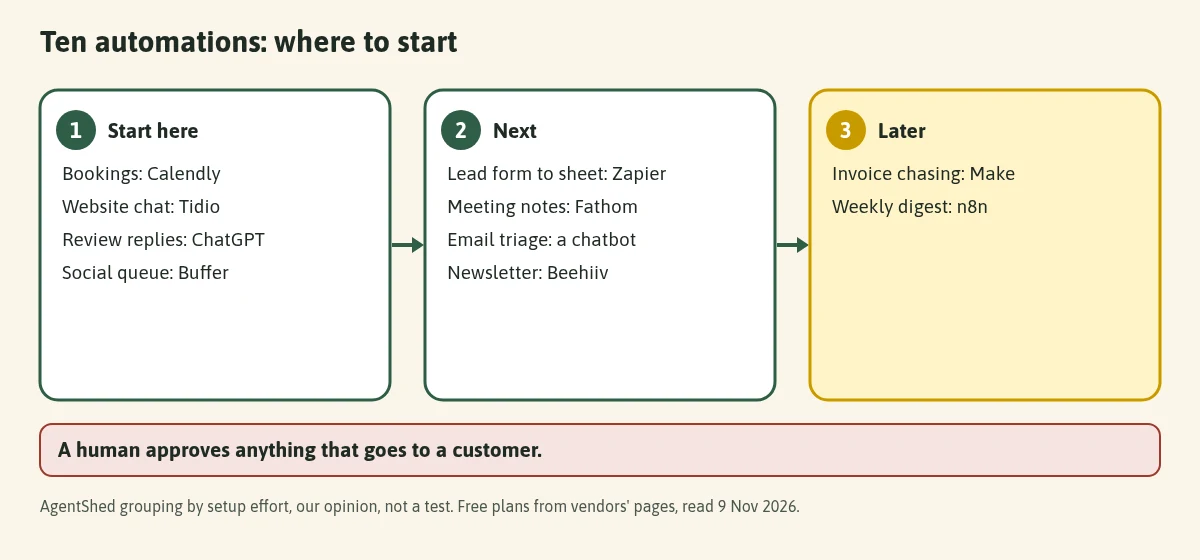
The best AI automations for a small business are the ones that take a repeated job off your list, starting with booking, website chat and review replies. Here are our ten, in the order we'd set them up:
- Online booking with Calendly
- Website chat with Tidio
- Review replies with ChatGPT
- A social media queue with Buffer
- Lead form to spreadsheet with Zapier
- Meeting notes to tasks with Fathom
- Email triage with a chatbot and Gmail
- A newsletter with Beehiiv
- Invoice chasing with Make
- A weekly admin digest with n8n
The order is our opinion, based on setup effort and how often each job comes up. We haven't hands-on tested these tools for this article. Free-plan details come from each vendor's pricing page, read on 9 November 2026.
How do the free plans compare?
| # | Automation | Tool | What the free plan lists | Setup effort (our view) |
|---|---|---|---|---|
| 1 | Booking | Calendly | "Always free": one event type, one calendar connection | Low |
| 2 | Website chat | Tidio | 50 billable conversations; first 50 AI (Lyro) conversations free, lifetime | Low |
| 3 | Review replies | ChatGPT | "Unlimited everyday text chats", with safeguards | Low |
| 4 | Social queue | Buffer | 3 channels, 10 scheduled posts per channel | Low |
| 5 | Lead capture | Zapier | 100 tasks a month, two-step Zaps | Medium |
| 6 | Meeting notes | Fathom | Unlimited recordings, instant call summaries | Low |
| 7 | Email triage | Chatbot + Gmail | Free chatbot plan; you paste in emails | Low |
| 8 | Newsletter | Beehiiv | Up to 2,500 subscribers, unlimited sends | Medium |
| 9 | Invoice chasing | Make | 1,000 credits a month | Medium |
| 10 | Weekly digest | n8n | Self-hosted Community Edition | High |
Prices and limits as listed on 9 November 2026. They may exclude VAT and change often.
Which automations should you set up first?
Booking, website chat and review replies. They're quick to set up and they deal with customers directly.
- Booking. Calendly's free plan lists one event type, one calendar connection and a booking page you can customise. One link replaces the "what time suits you?" back-and-forth. Our Calendly booking playbook walks through it.
- Website chat. Tidio's free plan lists 50 billable conversations and 10 seats. Its AI agent, Lyro, has "your first 50 conversations are free (lifetime)". That's enough to see whether visitors use chat at all. Use our Tidio chat playbook, or start on Tidio's free plan.
- Review replies. Paste a review into ChatGPT and ask for a short, specific reply. Our Google review replies playbook has the prompt. Read every reply before you post it.
Which automations save the most admin time?
Lead capture, meeting notes and email triage, in our view. These jobs come up every day.
- Lead form to spreadsheet. Zapier's free plan lists 100 tasks a month and two-step Zaps: one trigger, one action. A new form entry becoming a row in Google Sheets is exactly two steps. See our Zapier lead capture playbook.
- Meeting notes to tasks. Fathom's free plan lists "unlimited recordings, instant call summaries". Its Zapier and Make integrations are marked "limited use" on lower tiers, so copy the tasks across by hand at first. Our Fathom playbook shows how.
- Email triage. Ask a chatbot to sort ten emails into "reply today", "this week" and "no reply needed". Our Gmail and ChatGPT triage playbook has the prompt. Don't paste in anything sensitive. Our customer data guide explains why.
Which automations need a little more setup?
The newsletter, invoice chasing and the weekly digest. They pay off, but they take an afternoon, not ten minutes.
- Newsletter. Beehiiv's free plan lists up to 2,500 subscribers, unlimited sends and "no credit card required". Automations aren't on Free, so you send each issue yourself. Our Beehiiv page has the details.
- Invoice chasing. Make's pricing page says "If you are on the Free plan, you have 1000 credits per month". Most actions use one credit, and scenarios stop when credits run out. A weekly check for overdue invoices that drafts a polite reminder fits easily. Follow our Make invoice chasing playbook, or start on Make's free plan.
- Weekly admin digest. n8n's pricing page says "A standard, self-hosted version of n8n is available on GitHub". That's free only if you can run and update a server. The cloud plans start at "20€/mo, billed annually", with a trial. Our n8n digest playbook covers it, or see n8n.
Torn between Zapier, Make and n8n? Our Zapier vs Make vs n8n comparison sets out the differences.
What should you not automate?
Don't automate anything a customer would be upset to learn a machine sent, such as money decisions, complaints or one-off personal replies. In our view, that means:
- Money conversations. Let automation draft invoice reminders, but send them yourself until you trust the wording.
- Complaints. Use AI for a first draft, and always edit it.
- Publishing. Have automations create drafts and queue items, not post them.
The rule in our diagram applies to all ten: a human approves anything that goes to a customer.
Get the next guide by email. One email when we publish a new AI workflow. Join the AgentShed newsletter.
How we made this
AI-assisted, written from each vendor's pricing or help page, read on 9 November 2026. Quotes come from those pages. The order, the setup-effort ratings and the "our view" lines are our opinion, not test results. We haven't hands-on tested these tools for this article. Prices are as listed and may exclude VAT. See how we research a playbook.
FAQ
What is the easiest AI automation for a small business? Online booking. Calendly's free plan covers one event type and one calendar, and you share a single link.
Can I automate my small business for free? You can start for free. Every tool here lists a free plan or a free self-hosted version, each with limits. You'll pay once you outgrow those limits.
Is Zapier or Make better for a small business? Zapier's free plan is limited to two-step Zaps. Make's free plan gives 1,000 credits a month for longer scenarios. Our comparison goes further.
Do I need to code to automate my business? No, for nine of the ten. Self-hosting n8n needs some technical comfort.
Is it safe to let AI reply to customers? Keep a human approval step for anything customer-facing, at least to begin with.
Your next step
Pick the one job you did most often last week, find it in the table, and set up that automation on its free plan this week.
Sources (read 9 November 2026): Calendly pricing · Tidio pricing · OpenAI Help, Free Tier FAQ · Buffer pricing · Zapier pricing · Fathom pricing · Beehiiv pricing · Make pricing · n8n pricing
Sources
- Calendly pricing — accessed 9 November 2026
- Tidio pricing — accessed 9 November 2026
- OpenAI Help Center: ChatGPT Free Tier FAQ — accessed 9 November 2026
- Buffer pricing — accessed 9 November 2026
- Zapier pricing — accessed 9 November 2026
- Fathom pricing — accessed 9 November 2026
- Beehiiv pricing — accessed 9 November 2026
- Make pricing (affiliate link) — accessed 9 November 2026
- n8n pricing — accessed 9 November 2026
Related playbooks
Related tools
More from the blog
Tools
Free AI Tools for Small Businesses: 10 to Try, and Where Each Free Plan Runs Out
Ten free or free-to-try AI tools for small businesses, grouped by job, with what each free plan lists and where it stops. Pricing pages read on 1 November 2026.
7 November 2026
Guide
AI Agent vs Chatbot vs Automation: What's the Difference for a Small Business?
A plain-English guide to AI agents, chatbots and automation: who picks the next step, which job suits which, and what to keep in human hands.
11 November 2026
Guide
Automate Your Weekly Admin With AI: A 20-Minute Audit for Small Businesses
Pick one repeat admin job, try it by hand with an AI chat, then decide if Make or n8n is worth it. A short audit for small businesses, with practice data.
29 October 2026